
Key takeaways
Overtop Media Digital Marketing deploys Google Shopping checkout links and checkout_link_template feed architecture to compress mobile checkout friction. When Google identifies a high-intent mobile or tablet buyer on Shopping listings, Performance Max, or Demand Gen YouTube placements, the Buy now button routes the shopper straight into your cart with the exact SKU pre-loaded. Google reports an average 11% increase in conversion value at a similar cost per acquisition for advertisers providing checkout URLs in Demand Gen campaigns.
Our ecommerce engineers govern variant-level cart routing, mobile cart disclosures, and Storebot validation across your catalog. Rather than flipping a default toggle that drops variants or hits login walls, Overtop Media Digital Marketing structures supplemental feed templates and upgrades cart-level trust signals so direct-to-cart shoppers complete their purchase with confidence.
Every rollout is paired with server-side purchase attribution and controlled catalog testing to prove incremental revenue lift. We verify that every Buy now order is captured in Google Ads and GA4 without URL parameter collisions, scaling checkout links across the product categories where they expand net margin.
Checkout links are a second door for buyers who have already decided
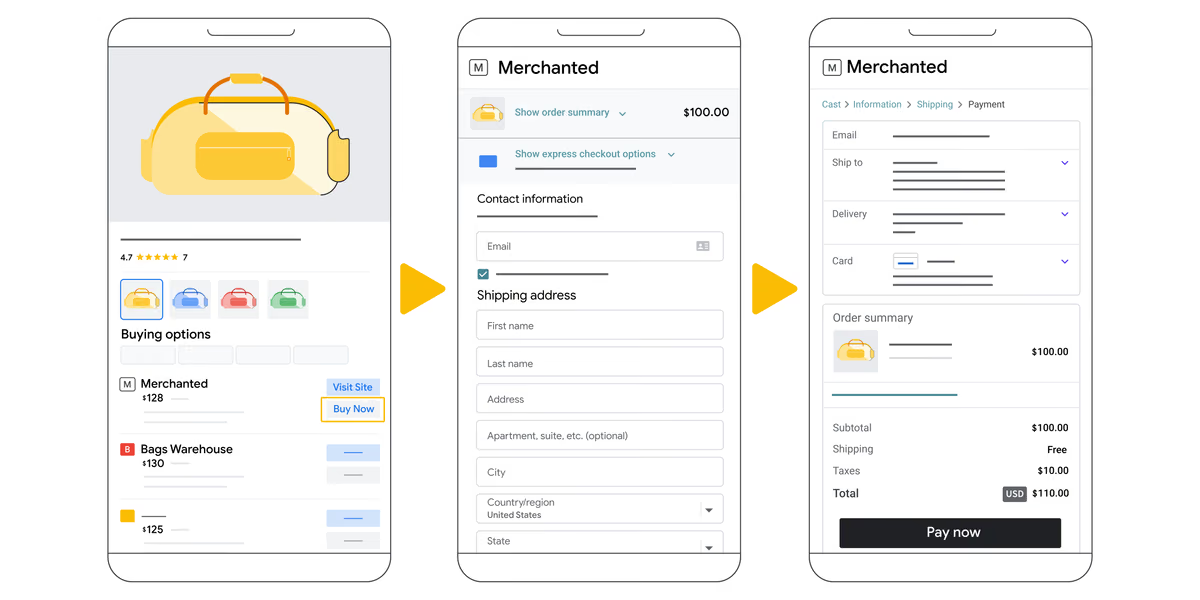
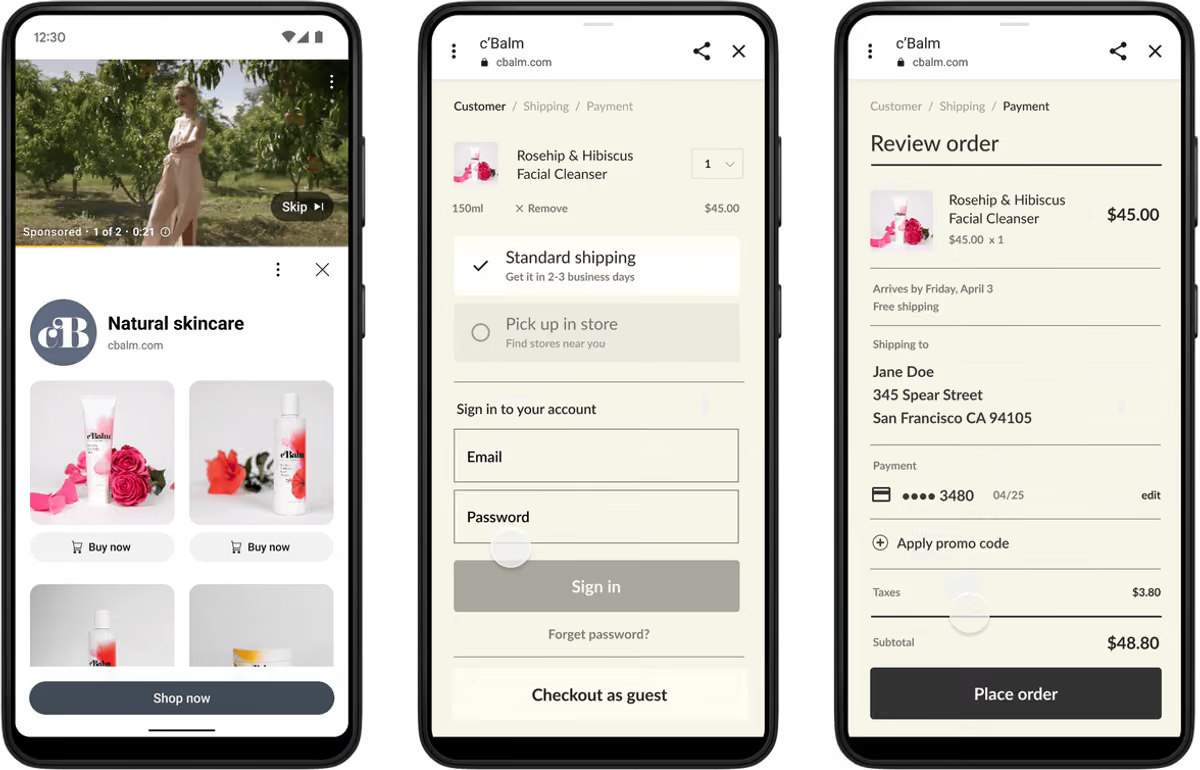
A checkout link is a URL you give Google that opens your cart or checkout page with a specific product already in it. Inside our Google Shopping ads management programs at Overtop Media Digital Marketing, when Google's systems judge that a shopper is ready to buy, they show a Buy now button Google Shopping mobile and tablet listings can trigger in a single tap so the shopper goes straight to paying.
Your normal product page link does not go away. Shoppers who want to read reviews, compare sizes or watch a video still get the Visit site path. A Google Ads checkout link is a second door, reserved for the people who have already made up their mind. According to Google's Merchant Center documentation on checkout links, checkout links Google Merchant Center validates appear only on mobile and tablet, and Google decides when to show them based on user intent, demographics and ongoing performance tests.
Where can it appear? Checkout links are available in 15 countries, including the United States, Canada, Great Britain, Australia, Germany, France and Japan. In the US they also extend to YouTube and Display formats, and Google's April 2025 announcement for Demand Gen campaigns confirmed the same accelerated checkout runs across Demand Gen on YouTube, Performance Max and organic shopping results.
One fewer step is worth real revenue on mobile
Most online carts never become orders. Baymard Institute's running average across 50 studies puts documented cart abandonment at roughly 70%. Every extra screen, slow page and repeated choice gives a buyer another chance to put the phone down.
Think about what the standard mobile Shopping path asks of a shopper who has already decided. They tap your ad, wait for the product page to load, scroll past the gallery, pick the size and color they already chose on Google, tap Add to cart, then open the cart. That is four or five moments of friction before checkout even starts. Baymard's cart abandonment research shows how quickly that friction adds up.
A checkout link removes most of it. Google's own numbers suggest the gain is meaningful: advertisers who provide checkout URLs see, on average, an 11% increase in conversion value at a similar cost per acquisition in Demand Gen campaigns, based on Google's US data from February 2025. For a store doing $50,000 a month in mobile ad-driven sales, a gain of that size is worth more than $60,000 a year in revenue at roughly the same ad cost.
The shopper already chose the product on Google. Making them choose it again on your site is the most expensive step in your funnel.
The catch is that the shortcut can cut both ways. Some shoppers still want the product page, and a cart page that hides shipping costs or return terms can raise abandonment instead of lowering it. That is why we treat checkout links as a feature to engineer and test, not a toggle to flip and forget.
How Overtop Media Digital Marketing Engineers Direct-to-Cart Checkout Architecture
Every stage of Overtop Media Digital Marketing's deployment protects the revenue lift between the Google Shopping auction and your order confirmation page: Storebot qualification, variant-accurate feed templates, cart persuasion, server-side attribution, and controlled catalog testing.
1. We validate Storebot access and guest-checkout readiness
Google requires every checkout link to load the item into the cart via an unauthenticated HTTP GET request, support guest checkout without a login gate, match your verified Merchant Center domain, and remain accessible to Google's Storebot validation crawler on its 24-hour verification cycle.
Overtop Media Digital Marketing tests every cart endpoint from clean mobile sessions before enabling feed attributes. What you get: zero disapproved links, zero Buy now clicks hitting login walls or empty carts, and uninterrupted Merchant Center validation.
2. We engineer variant-accurate checkout feed architecture
Merchant Center checkout settings support either an account-level template or the product-level checkout_link_template feed attribute, while a Shopify checkout link Google integration through the Google and YouTube channel opts US stores in by default. Overtop Media Digital Marketing selects and governs the architecture that matches your ecommerce platform and variant complexity so shoppers never land in checkout with the wrong size, color, or pack quantity:
| Ecommerce Platform | Unmanaged Product-Page Drop-Off | Overtop Media Digital Marketing Direct-Checkout Architecture | Client Revenue Outcome |
|---|---|---|---|
| Shopify and Shopify Plus | Default app opt-in leaves unverified variant mappings, missing cart disclosures, or login walls that abandon mobile Buy now clicks. | Audits Google and YouTube channel variant permalinks, enforces guest checkout, and layers supplemental checkout_link_template controls by product margin tier. | Captures instant Shop Pay and mobile wallet checkouts from high-intent Shopping and YouTube Demand Gen buyers. |
| Multi-Variant Catalogs (WooCommerce, BigCommerce, Custom) | Account-level templates pass parent SKU IDs instead of specific size or color variant IDs, dropping shoppers into empty or errored carts. | Engineers supplemental feeds mapping each variant's exact cart endpoint to checkout_link_template and suppresses complex made-to-order SKUs. | Eliminates variant-mismatch abandonment and concentrates Buy now traffic on ready-to-ship, high-converting items. |
| Single-SKU and Replenishment Catalogs | Repeat mobile buyers are forced through slow product-page galleries and multi-step cart drawers before they can pay. | Configures unified Merchant Center direct-cart routing paired with sub-second mobile checkout rendering and pre-populated quantity rules. | Compresses mobile path-to-purchase and lifts repeat-order conversion value at a stable cost per acquisition. |
| Structured-Data Crawled Catalogs | Crawled product listings lack feed-level checkout URLs, forfeiting Buy now placement on mobile Shopping and organic results. | Synchronizes checkoutPageURLTemplate schema markup with primary Merchant Center feed governance so crawled and feed items stay aligned. | Expands accelerated checkout eligibility across both paid Shopping auctions and free mobile product listings. |
3. We make your cart page do the selling
When shoppers skip the product page, everything they would have read there needs a new home. Google requires merchants to display product warnings and mandatory disclosures on the checkout page alongside the product page, and recommends surfacing brand identity, product imagery, variant details, full price breakdowns, return windows, and shipping timelines directly inside the cart.
Overtop Media Digital Marketing audits and upgrades your mobile cart and checkout layout so direct-to-cart buyers see total landed cost, delivery dates, and return assurances immediately. What you get: higher cart completion rates across both Buy now clicks and standard site traffic.
4. We protect your tracking and bidding signals
Because Google advises against appending tracking parameters to checkout URL templates, attribution must be governed through verified purchase events. Overtop Media Digital Marketing validates order-confirmation conversion firing across Google Ads and GA4 for every direct-to-cart transaction.
We pair the deployment with Enhanced Conversions and server-side tracking so browser restrictions never hide mobile orders from Smart Bidding. What you get: every incremental Buy now order is credited and fed back into your bidding models.
5. We test it and prove the lift before scaling
Because Google surfaces the Buy now button dynamically on mobile and tablet devices, blended desktop-and-mobile reporting obscures true performance. Overtop Media Digital Marketing launches checkout links on a controlled catalog segment and measures mobile conversion value, CPA, cart completion, and refund rates against a matched control group over a full buying cycle.
What you get: verified revenue proof showing which product categories gain the highest margin lift from direct-to-cart routing and where standard product pages remain the stronger path.
Want checkout links running on your catalog? Request a Checkout Link Audit and our specialists will evaluate your feed, cart, and attribution readiness.
What checkout links could add for your store
Check what is already true for your store, then enter your monthly Google Shopping and Performance Max spend, your return on ad spend and the share of that revenue that comes from phones and tablets. The estimator scores your readiness and sizes the opportunity using Google's reported average lift.
Checkout Link Readiness and Revenue Estimator
Built from the checks we run before enabling checkout links for a client.
Overtop Media Digital Marketing engineers variant-accurate checkout_link_template feeds and server-side attribution to turn your mobile Shopping traffic into completed orders.
Planning illustration, not a forecast. Added revenue applies Google's reported 11% average conversion value lift to your mobile and tablet ad revenue. Your result depends on your products, prices and how often Google shows the button.
How Overtop Media Digital Marketing Audits Merchant Center Feed Health and Checkout Attribution
Many stores appear enabled inside Merchant Center while quietly dropping mobile orders due to variant mismatches, crawler blocks, or broken attribution. Overtop Media Digital Marketing audits and governs seven critical technical checkpoints across every client storefront:
- Clean Checkout URL Templates Without Parameter Collisions: Appending UTM strings directly to a checkout link template interferes with Merchant Center validation. Overtop Media Digital Marketing keeps checkout URLs clean and captures full campaign attribution through server-side and order-confirmation conversion tracking.
- Zero-Session Mobile Cart Persistence: A link that works for a logged-in developer often fails for a first-time mobile buyer. Our engineers validate every cart endpoint in isolated mobile sessions so guest shoppers land with their item ready to purchase.
- Feed-to-Cart Variant ID Reconciliation: When a store's cart requires internal variant IDs rather than parent catalog SKUs, Overtop Media Digital Marketing builds automated supplemental feeds that map each size, color, and pack option to its exact cart URL.
- Single-Method Merchant Center Governance: Running residual account-level settings alongside feed-level attributes creates validation conflicts. Our team standardizes your Merchant Center configuration under one authoritative method.
- Storebot Crawler Whitelisting: Edge firewalls and bot filters frequently block Google's Storebot from verifying cart URLs. We align your security rules so Storebot validates pricing and cart availability without interruption.
- Cart-Level Disclosure and Trust Architecture: When shoppers bypass the product page, mandatory warranties, subscription terms, and shipping thresholds must live inside the cart. We embed those signals directly into your mobile checkout flow.
- Mobile-Segmented Lift Attribution: Because Buy now buttons render strictly on phones and tablets, blended desktop reporting masks their impact. Overtop Media Digital Marketing isolates mobile and tablet telemetry to prove net revenue expansion.
Buy now pays most where the shopper decided before the click
Checkout links help most where the shopper has already decided before they reach your site. They help least where the product page is doing real persuasion that the cart cannot replace.
Strong candidates include replenishment and repeat purchases such as supplements, pet food, beauty and household goods; well-known brands and models where the shopper is choosing a store, not a product; simple products with few options; and gift purchases during peak season, when speed matters most. In our experience these products often sit in the same groups we already separate in a segmented Performance Max structure, which makes them easy to test first.
Weaker candidates are high-consideration and custom items: furniture with fabric choices, made-to-order products, technical equipment that needs a spec check, and anything where fit or compatibility questions drive returns. For those we often leave the product page as the only path, or enable checkout links on the best-selling, most-reviewed configurations only.
Checkout links are one lever, not a strategy
Checkout links are one lever in a larger system. As a Charlotte digital marketing agency managing ecommerce budgets for brands across the Carolinas and beyond, we connect them to the rest of the work. Our Google Ads management runs Shopping, Performance Max and Demand Gen on revenue-tied data, and checkout links make every one of those campaigns more efficient on mobile. Our Demand Gen and YouTube strategy analysis covers the video side, where the Buy now button turns product discovery into a purchase.
Peak season is where it matters most. Our holiday retail ecommerce analysis shows how we prepare feeds, budgets and creative for the busiest weeks of the year, and checkout links belong on that checklist before traffic peaks. For the organic side of the same catalog, our ecommerce SEO analysis covers where large catalogs lose organic revenue and the site improvements that lift every order.
Our specialists turn Shopping listings into direct sales for apparel brands, jewelry stores, sporting goods stores, cosmetics brands, pet brands, and every industry we serve.
Frequently Asked Questions About Checkout Links
What is a checkout link in Google Shopping?
A checkout link is a direct-to-cart URL architecture in Google Merchant Center that opens your cart or checkout page with the shopper's selected product already added. When Google's auction signals indicate a mobile shopper is ready to purchase, a Buy now button appears beside your listing while preserving the standard product page link for comparison shoppers. Overtop Media Digital Marketing engineers and tests this path to lift client conversion rates.
Where do Google Shopping checkout links appear?
Google Shopping checkout links appear on mobile phones and tablets across Shopping ads, free product listings, Performance Max campaigns, and Demand Gen YouTube placements in the United States and 14 additional supported countries. Overtop Media Digital Marketing segments mobile and tablet performance reporting so our clients see the exact revenue contribution of accelerated checkout traffic.
Do checkout links increase ecommerce revenue?
Google reports that advertisers providing checkout URLs see an average 11% increase in conversion value at a similar cost per acquisition in Demand Gen campaigns, based on February 2025 US internal data. Overtop Media Digital Marketing deploys checkout links as a controlled catalog experiment, measuring conversion value, cart completion, and return rates before scaling catalog-wide.
How does Overtop Media Digital Marketing choose between account-level templates and checkout_link_template?
Overtop Media Digital Marketing deploys account-level URL templates for single-SKU stores where one cart pattern resolves every item, and builds supplemental product-level checkout_link_template feeds whenever size, color, or pack variants require distinct cart endpoints or selective SKU eligibility.
How does Overtop Media Digital Marketing manage checkout links on Shopify?
While US Shopify stores using the Google and YouTube channel are opted in by default, default opt-in rarely guarantees variant accuracy or cart-level disclosure compliance. Overtop Media Digital Marketing audits guest checkout behavior, variant ID resolution, shipping and return disclosures, and server-side purchase attribution across every client Shopify storefront.
How does Overtop Media Digital Marketing protect conversion tracking on Buy now orders?
Because Google prohibits appending tracking parameters to checkout URL templates, Overtop Media Digital Marketing verifies order-confirmation purchase events across Google Ads and GA4 and pairs the deployment with Enhanced Conversions and server-side tracking so Smart Bidding captures every direct-to-cart sale.
Why partner with Overtop Media Digital Marketing for Google Shopping checkout links?
Enabling the Merchant Center setting takes minutes, but capturing the revenue lift requires variant-accurate cart routing, mobile cart persuasion, Storebot crawl validation, and server-side attribution. Overtop Media Digital Marketing manages the entire architecture inside our Google Shopping, Performance Max, and Demand Gen programs.
Keep reading.
 Performance Max Performance Max Feed Segmentation: Where Profit Leaks and What Fixes It Structuring your catalog so budget follows margin, not just clicks. Read the analysis
 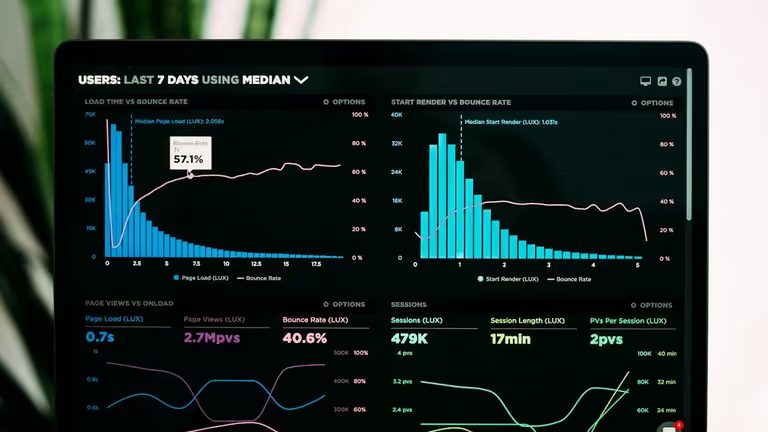 Analytics and attribution Server-Side Tracking, GA4 and Attribution: Where Conversion Data Breaks and What It Costs Rebuilding the conversion signal that privacy changes took away. Read the analysis
  Ecommerce 2026 AI Holiday Ecommerce in Charlotte: What Separates the Online Brands That Win in Conversational Search Preparing feeds, budgets and creative for the busiest weeks of the year. Read the analysis
 Want Your Ad Clicks Landing in the Cart?
We will check whether your store and catalog qualify for checkout links today, show you what is blocking them, and map a measured rollout, from URL templates and cart page fixes to tracking and a controlled test, so you know exactly what Buy now adds to your revenue.